Understanding Color, Contrast, and Single Sense
Summary
Section titled “Summary”Making good color choices ensures that information is visible to as many sighted readers as possible and can be understood even when printed in grayscale with all of the color removed. This includes text, buttons, icons, and any other content that has meaning or conveys information. Color affects accessibility in two ways:
- Colors must have good contrast so information stands out from the background.
- Content must not rely on color alone to convey information.
Poor color choices can impact all of us in certain situations such as looking at a phone screen with sun glare or a computer in low-light conditions, but it can especially impact people with color blindness, low or limited vision, and people with certain cognitive disabilities. Even people who are blind can be impacted when color alone conveys information. Good color choices can be the difference between content that is easy for everyone to see and use, and content that can actually prevent people from understanding information or completing a task.
Overview
Section titled “Overview”Two key concepts ensure everyone can distinguish differences in color to read text and understand informative visual cues that are based on color:
- Have good color contrast.
- Never rely on color alone to convey information.
When we talk about color contrast we usually mean the difference in brightness between two colors. This may be:
- text or other meaningful page content and the background
- the colors of a border and the colors within
- adjacent blocks of color that convey meaning, such as in a pie chart
In short, color contrast defines how well content stands out.

Watch this short Colors with Good Contrast video from the Web Accessibility Initiative to see how good contrast supports people with disabilities while providing a better experience for everyone.
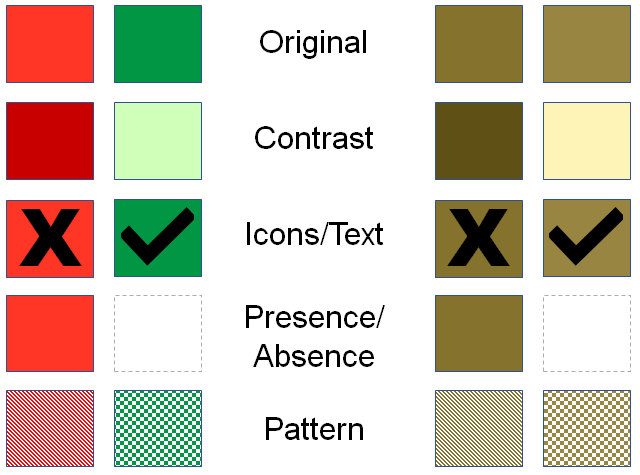
Never relying on color alone to convey information means that when the color is informative there must always be a second indicator in addition to the color. This might be:
- adding a message explaining form errors in addition to turning form fields red
- adding patterns to each line in a graph
- adding pass and fail indicators on a spreadsheet in addition to red and green background colors
Always providing a second indicator helps people understand the information conveyed by color.
Who is Helped
Section titled “Who is Helped”Accessible color choices help people with color blindness, low or limited vision, people who are blind, and people with certain cognitive disabilities.
People with color blindness, or low or limited vision
- Rely on good color contrast
- Cannot always distinguish between colors
People who are blind
- Cannot understand color-based information unless text alternatives exist
People with cognitive disabilities
- May struggle with oversaturated or high-contrast colors
People requiring specific colors
- May need to override colors using system or browser settings
Text Contrast
Section titled “Text Contrast”Text contrast defines how well the text color stands out from the background color.
Good contrast improves readability for everyone.
Non-text Contrast
Section titled “Non-text Contrast”Good non-text contrast ensures that visual elements like buttons, icons, and borders are visible.
Meaningful visual elements include:
- Icons
- Charts
- Borders
- Buttons
- Interactive states
Never Rely on Color Alone
Section titled “Never Rely on Color Alone”Color alone must never be the only way to convey information.
Always include an additional indicator.
Examples:
- Labels
- Icons
- Patterns
- Text instructions